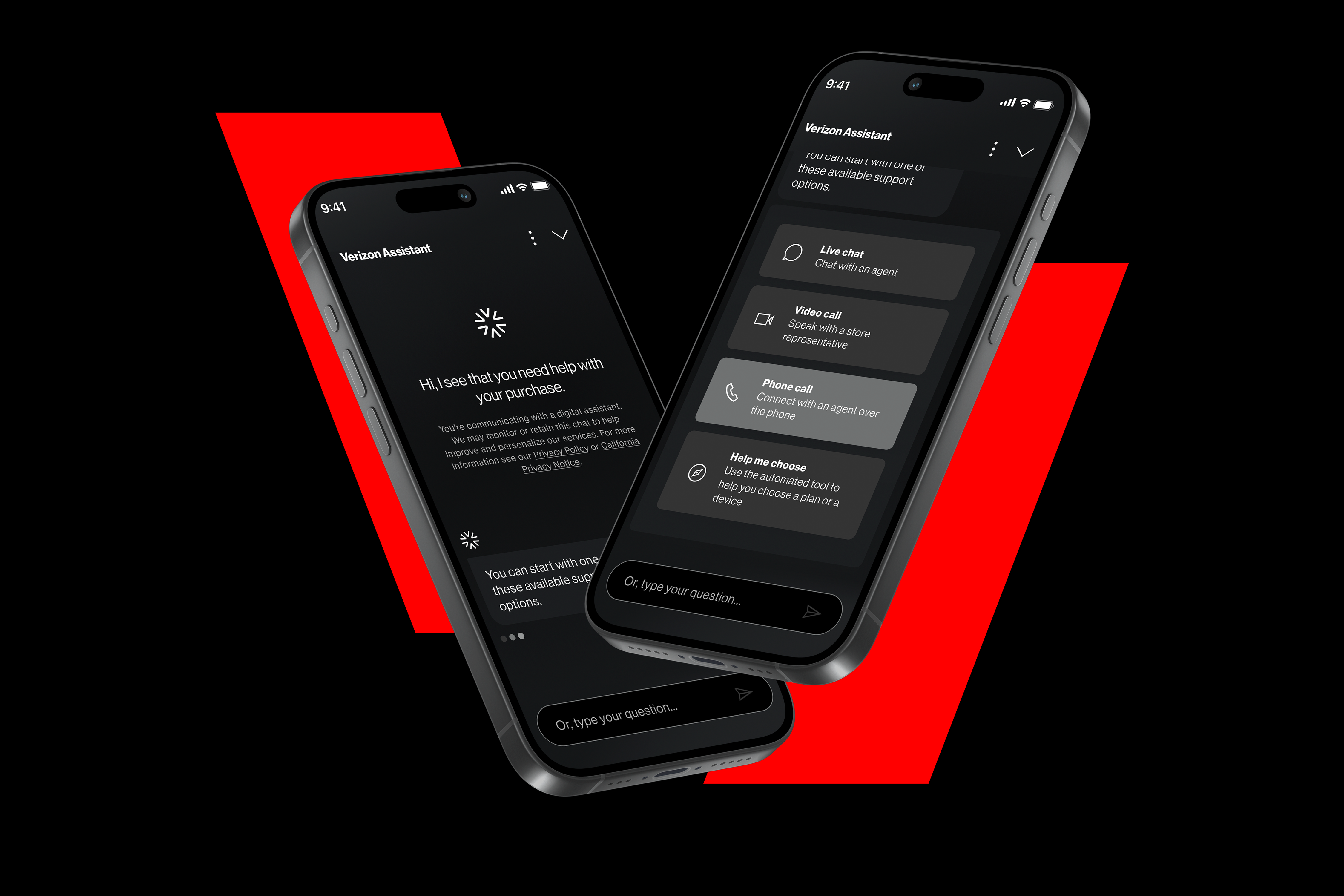
Verizon AI Assistant is a new AI solution designed to help customers handle billing, account management, and technical support questions through an interactive conversational interface. This is an overview of the product, and design system that I contributed to.
Agency:
Publicis Sapient
Contributions:
Product Design
Visual Design
Design System
Brand Identity
Role:
Experience Design Lead
Hey there, this is the default text for a new paragraph. Feel free to edit this paragraph by clicking on the yellow edit icon. After you are done just click on the yellow checkmark button on the top right. Have Fun!
Verizon AI Assistant
Overview
In 2025, during my time at Publicis Sapient, I was given an exciting project to tackle. Verizon which is one of our largest accounts wanted to build a new AI chat assistant to address the shortcomings of its legacy chatbot - plagued by latency, confusing prompts, and unresolved queries that frustrated a diverse customer base. The solution centered on a robust conversational design system, enabling seamless, intuitive interactions while balancing advanced AI capabilities to deliver faster, more personalized, and scalable customer experiences.
Definition of Success
Hey there, this is the default text for a new paragraph. Feel free to edit this paragraph by clicking on the yellow edit icon. After you are done just click on the yellow checkmark button on the top right. Have Fun!
Verizon's definition of success centered on three signals: customers completing tasks without escalating to a live agent, increased engagement with the assistant over time, and a measurable lift in product and plan sales driven through the conversational interface.
Timeline
Hey there, this is the default text for a new paragraph. Feel free to edit this paragraph by clicking on the yellow edit icon. After you are done just click on the yellow checkmark button on the top right. Have Fun!
Verizon's initial expectation was a faster turnaround - closer to a 5 to 6 month window. However, as research uncovered the depth of customer frustrations and the need for a scalable conversational design system that could support future AI features, the timeline was extended to 8 months to ensure the solution was built to last, not just built as a UI refresh.
User Research
Hey there, this is the default text for a new paragraph. Feel free to edit this paragraph by clicking on the yellow edit icon. After you are done just click on the yellow checkmark button on the top right. Have Fun!
Before a single pixel was designed, it was critical to develop a deep understanding of where the existing chatbot experience was breaking down and why. Research was conducted with 40+ customer participants as well as Verizon employees, which included customer service representatives, support agents, and product team members who interact with the current chatbot and its pain points on a daily basis.
Two research methods were used in combination to build a comprehensive picture:
1. Usability Testing on the Existing Chatbot: Employees and Customers were tasked to use the existing chatbot, consistently revealing an experience damaged by too many steps, unclear prompts, and frequent failure to resolve issues without human escalation.
2. Surveys & Questionnaires: A structured survey distributed across the internal team and customers captured sentiment - measuring satisfaction, task confidence, and expectations for what an AI-powered replacement needed to deliver. What was discovered through these valuable surveys was that there was a common theme of highest-frequency pain points and it boiled dow to choosing a product or plan, paying a bill and getting technical support. These three use cases emerged as the dominant areas of focus for Verizon customers and directly shaped the conversation flows prioritized in the design.
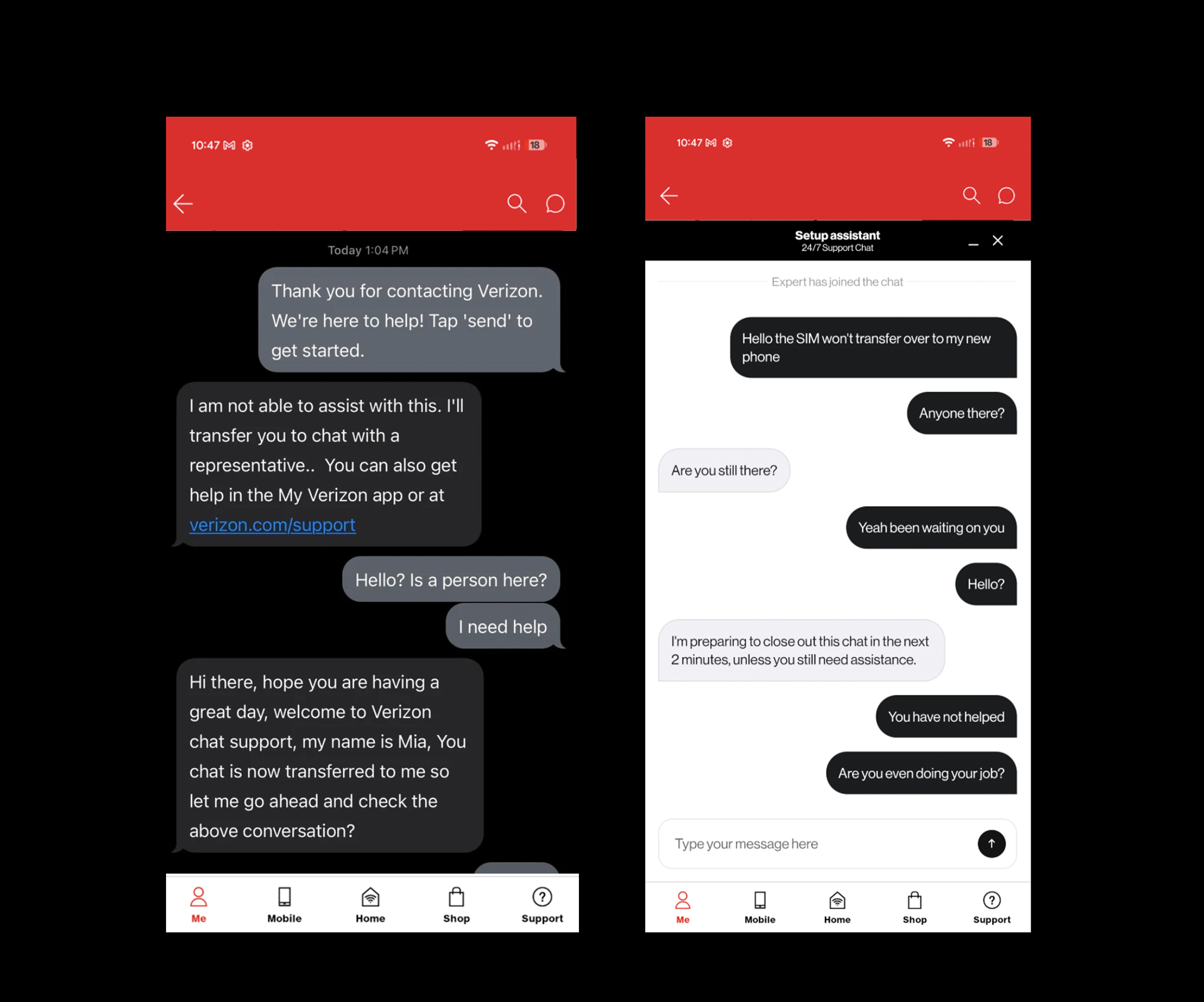
Usability Testing: Constant drop-offs, poor communication and confusing prompts leading to frustrated Verizon customers.
Surveys & Questionnaires: Example of the Verizon survey that was distributed to internal teams and customers to understand their frustrations and experience with the current chatbot and what their expectations are with the new Verizon AI Assistant.
Journey Mapping
To align the team around the customer experience, a future-state journey map was created across three core scenarios: choosing a product or plan, paying a bill, and getting technical support - each anchored to Verizon's primary digital entry points.
The journey was structured around the specific moments where the old chatbot had historically broken down, tracking customer actions, AI responses, and emotional state at each stage. The goal was simple: every touchpoint should move the customer from uncertainty to resolution, without a single unnecessary handoff to a live agent.
| 1 — Arrive | 2 — Engage | 3 — Explore | 4 — Decide | 5 — Complete | |
|---|---|---|---|---|---|
| Entry point |
Homepage chat widget
Product wall CTA
Plan comparison page
|
||||
| User action | Opens AI assistant Customer clicks the chat widget after browsing devices |
States their need Types or speaks: "I need a new phone for my teenager" |
Reviews suggestions Browses AI-curated device + plan bundles in the widget |
Asks follow-up "Does this plan include hotspot?" — gets instant answer |
Selects & proceeds Taps "Add to cart" directly from assistant interface |
| AI response | Greets predictively Recognizes browsing context, offers relevant help immediately |
Confirms & clarifies Asks 1–2 qualifying questions: budget, current plan, usage |
Surfaces options Displays widget with top 3 matched devices + plan pairings |
Answers in context Pulls plan details inline — no redirect to another page |
Confirms & upsells Summarizes order, surfaces optional protection plan add-on |
| Customer feel | Curious | Guided | Engaged | Confident | Satisfied |
| 1 — Arrive | 2 — Identify | 3 — Review | 4 — Confirm | 5 — Complete | |
|---|---|---|---|---|---|
| Entry point |
Homepage chat widget
My Verizon account page
Bill notification email CTA
|
||||
| User action | Opens AI assistant Customer arrives after receiving a billing notification |
Asks about bill "Why is my bill higher this month?" or "I need to pay my bill" |
Reviews balance Views current balance and itemized breakdown inside widget |
Selects payment Chooses payment method from options shown in the interface |
Confirms payment Taps confirm — receives instant in-chat confirmation |
| AI response | Recognizes intent Detects billing context, pulls account data proactively |
Explains clearly Shows line-item breakdown explaining any billing changes |
Displays widget Balance + payment options surface directly in conversation |
Processes securely Handles payment without leaving the chat interface |
Confirms & closes Sends receipt, offers to help with anything else |
| Customer feel | Concerned | Informed | In control | Reassured | Relieved |
| 1 — Arrive | 2 — Describe | 3 — Diagnose | 4 — Resolve | 5 — Confirm | |
|---|---|---|---|---|---|
| Entry point |
Homepage chat widget
Support page CTA
My Verizon app
|
||||
| User action | Opens AI assistant Customer arrives frustrated — device or service issue |
Describes issue "My phone keeps dropping calls in my neighborhood" |
Answers prompts Responds to quick AI questions about device, location, frequency |
Follows steps Completes guided troubleshooting steps shown in the widget |
Confirms resolution Confirms issue resolved — or escalates to callback if not |
| AI response | Acknowledges issue Opens with empathy, sets expectation of fast resolution |
Gathers context Asks targeted qualifying questions — no generic menus |
Checks network Pulls real-time network data for customer's location |
Guides resolution Delivers step-by-step fix with inline multi-choice support options |
Closes or escalates Schedules callback with full context — agent never starts cold |
| Customer feel | Frustrated | Heard | Engaged | Hopeful | Resolved |
Conversational Design System
Before any UI screens could be designed, a conversational design system needed to be established — one that would serve as the foundational framework for every interaction the AI assistant would have with a Verizon customer. Built on top of Verizon's existing brand system, the design system extended the established color palette, typography and interface elements into the new conversational context, fostering a recognizable and intuitive identity for the AI assistant.
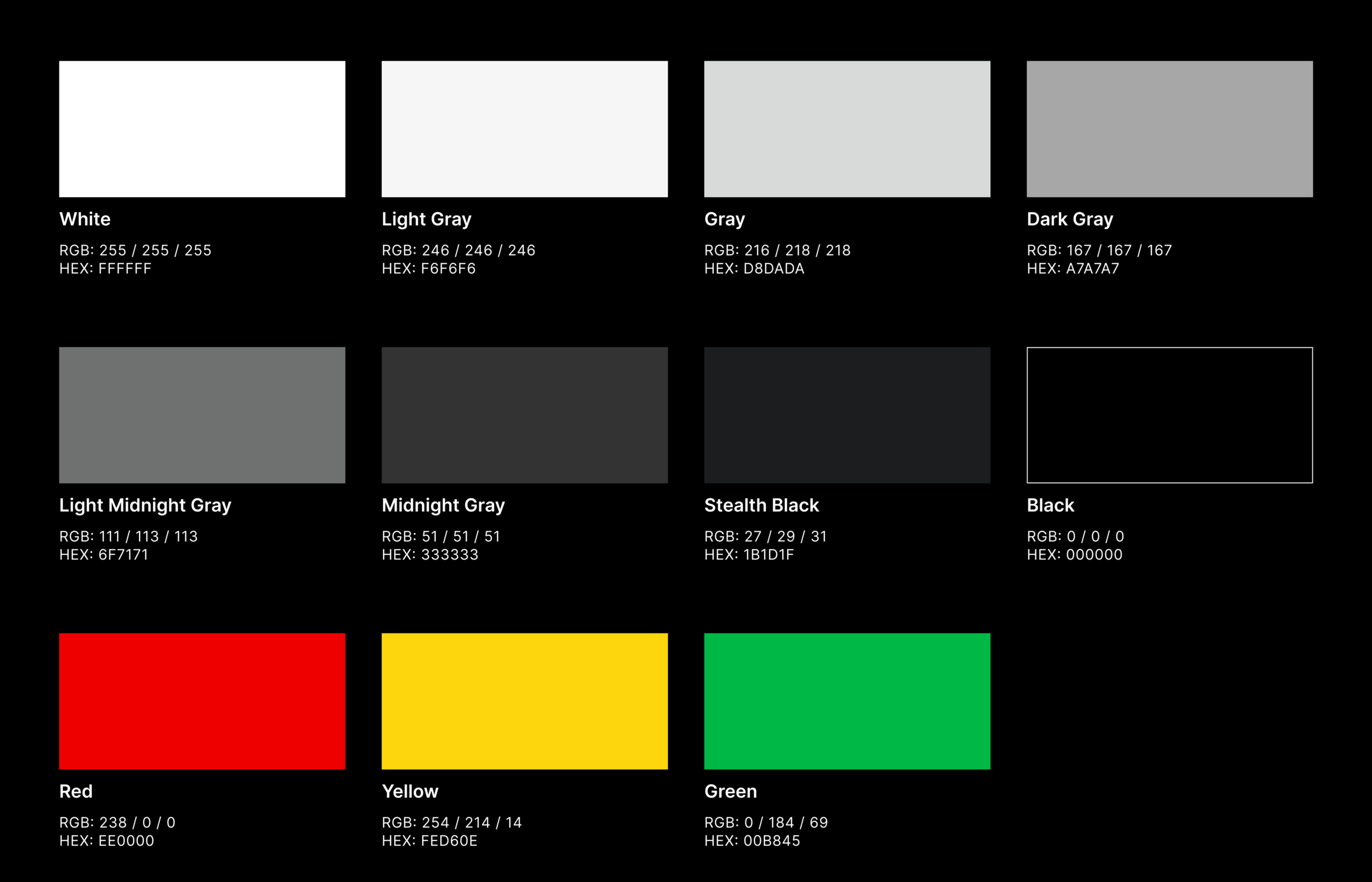
Color Palette
The Verizon AI assistant employs a color palette that is clear and consistent helping to reinforce the Verizon brand identity. While also maintaining its rules and accessibility guidelines.
Typography
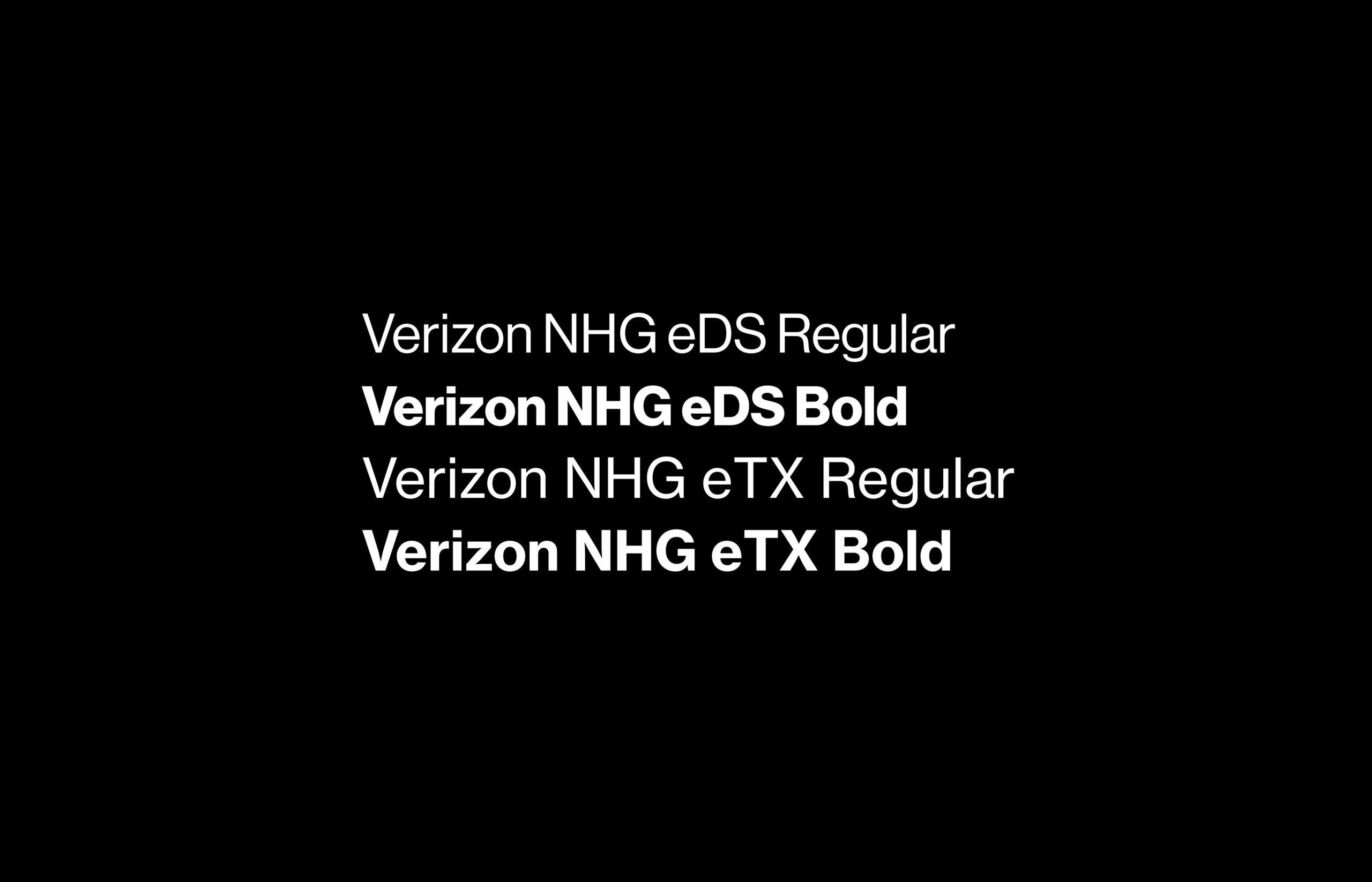
Verizon Neue Haas Grotesk is the main typeface for the AI assistant and is an essential part to the brand identity. It is impactful, clear and easy to read.
Verizon NHG eDS and DS (eDisplay and Display):
- eDisplay is used for visual impact, type sizes 13px and above. For example, in titles and subtitles.
- Display is used for larger text sizes on digital, type sizes 32px and above. For example, in titles.
Verizon NHG eTX (eText):
- eText is used for legible body small and micro text only, type sizes 12px and below. For example, page body text and legal.
Interface Elements
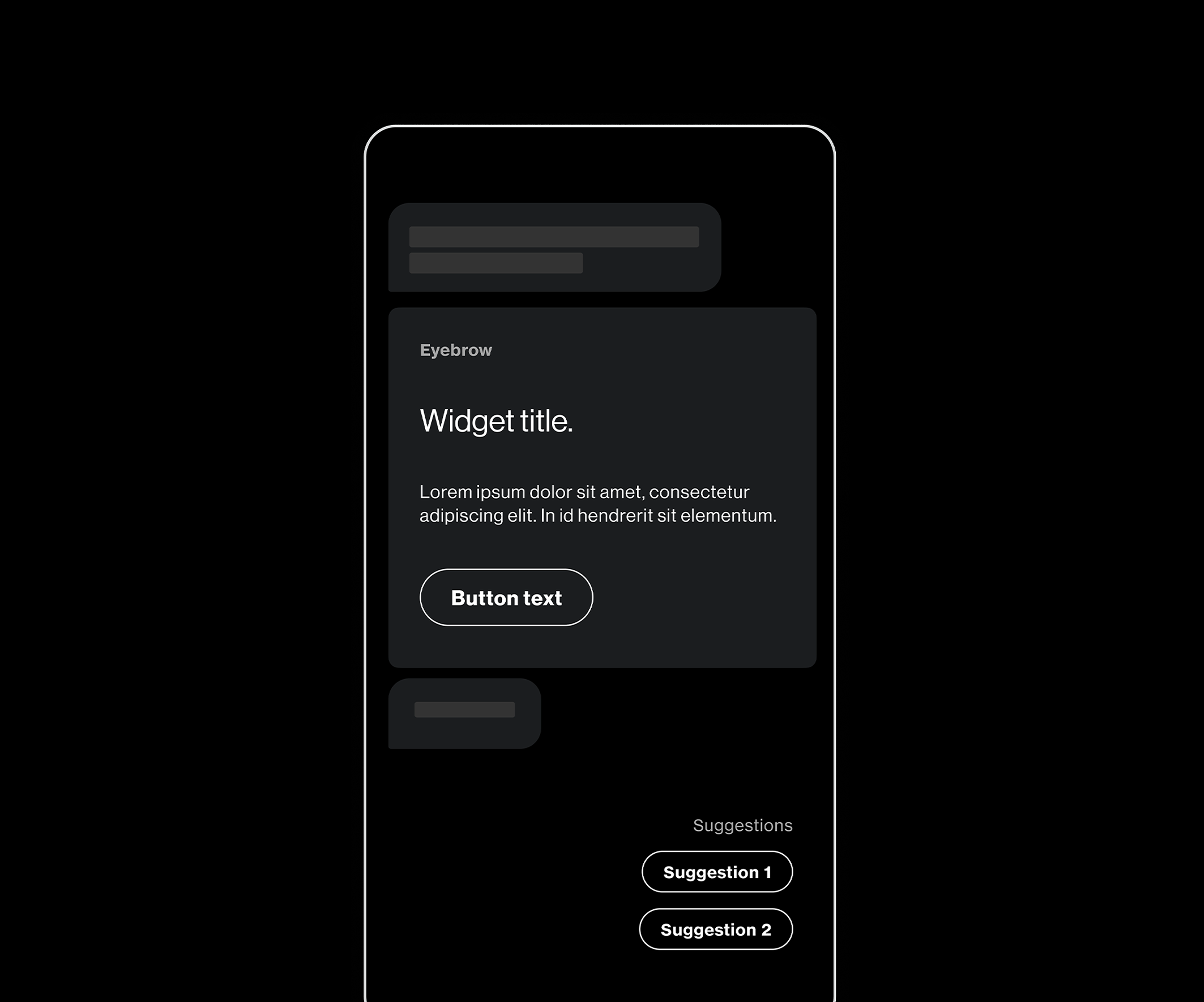
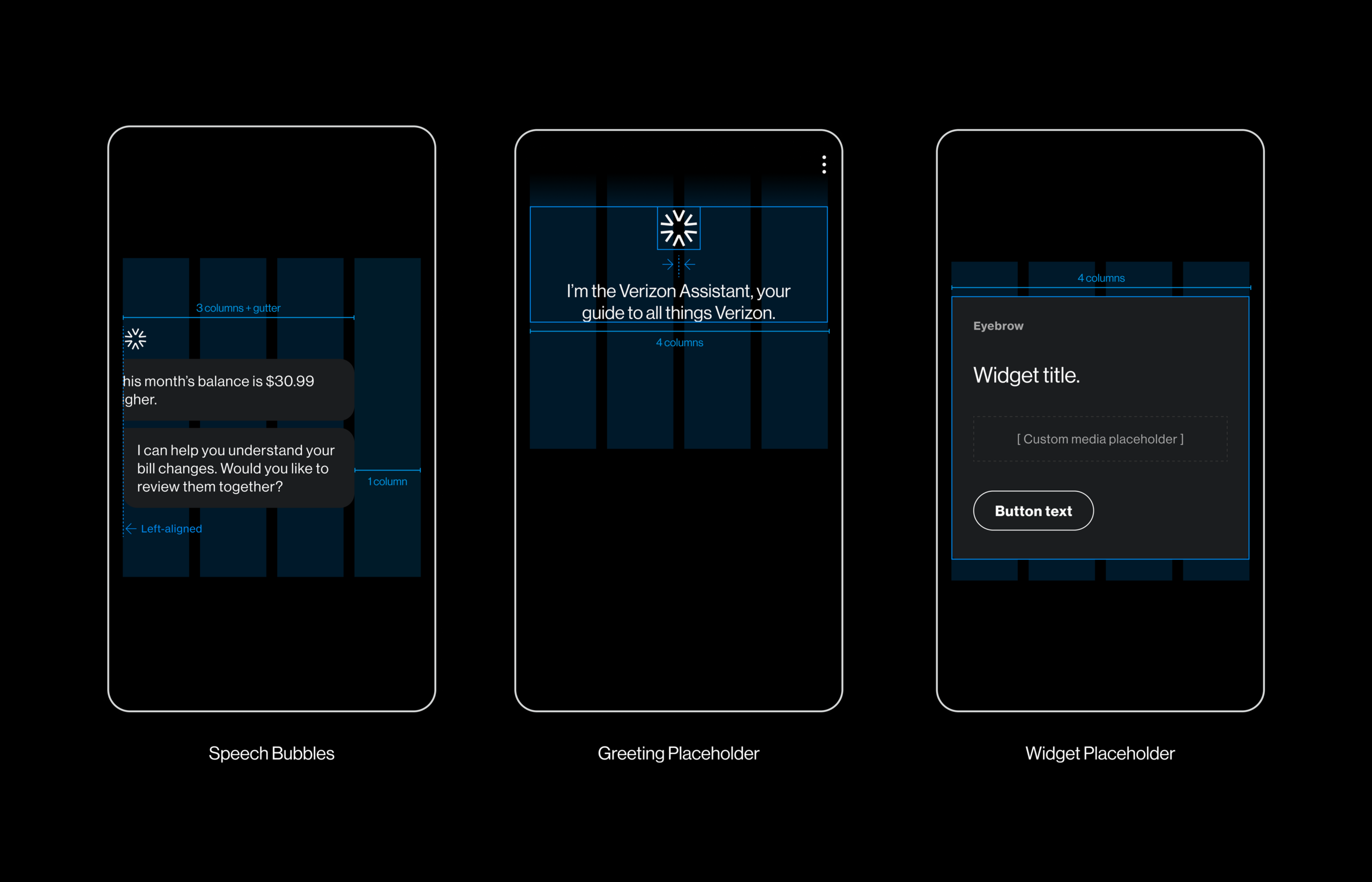
The Verizon AI assistant layout can be divided into single or multi-item interface elements spanning various components. For example, the AI’s speech bubbles and greeting/widget placeholders.
Speech Bubbles:
- Speech bubbles are left aligned and extend across a maximum of 3 columns and a gutter.
Greeting/Widget Placeholder:
- The Greeting/Widget placeholder spans all 4 columns of the grid.
UI Designs
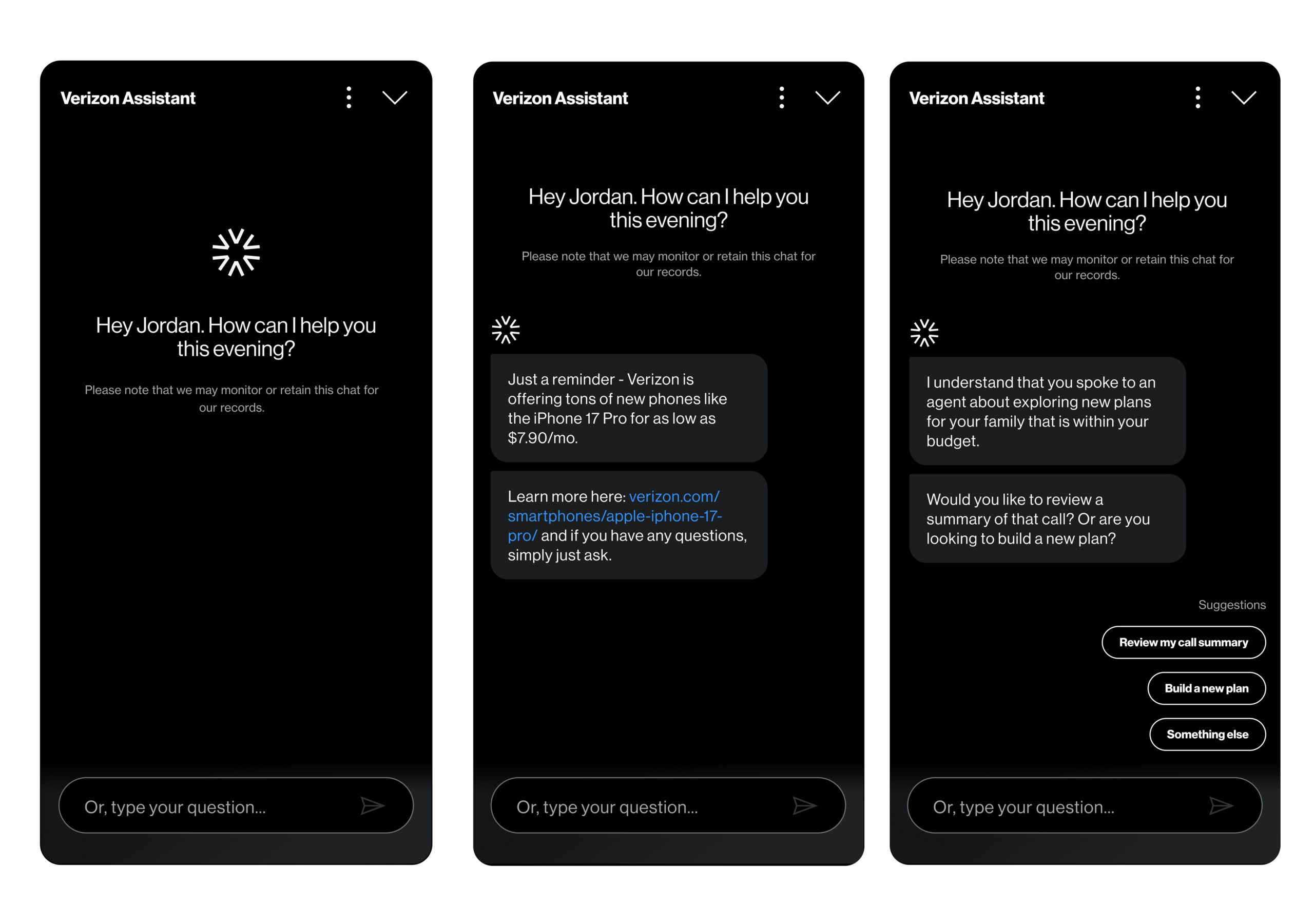
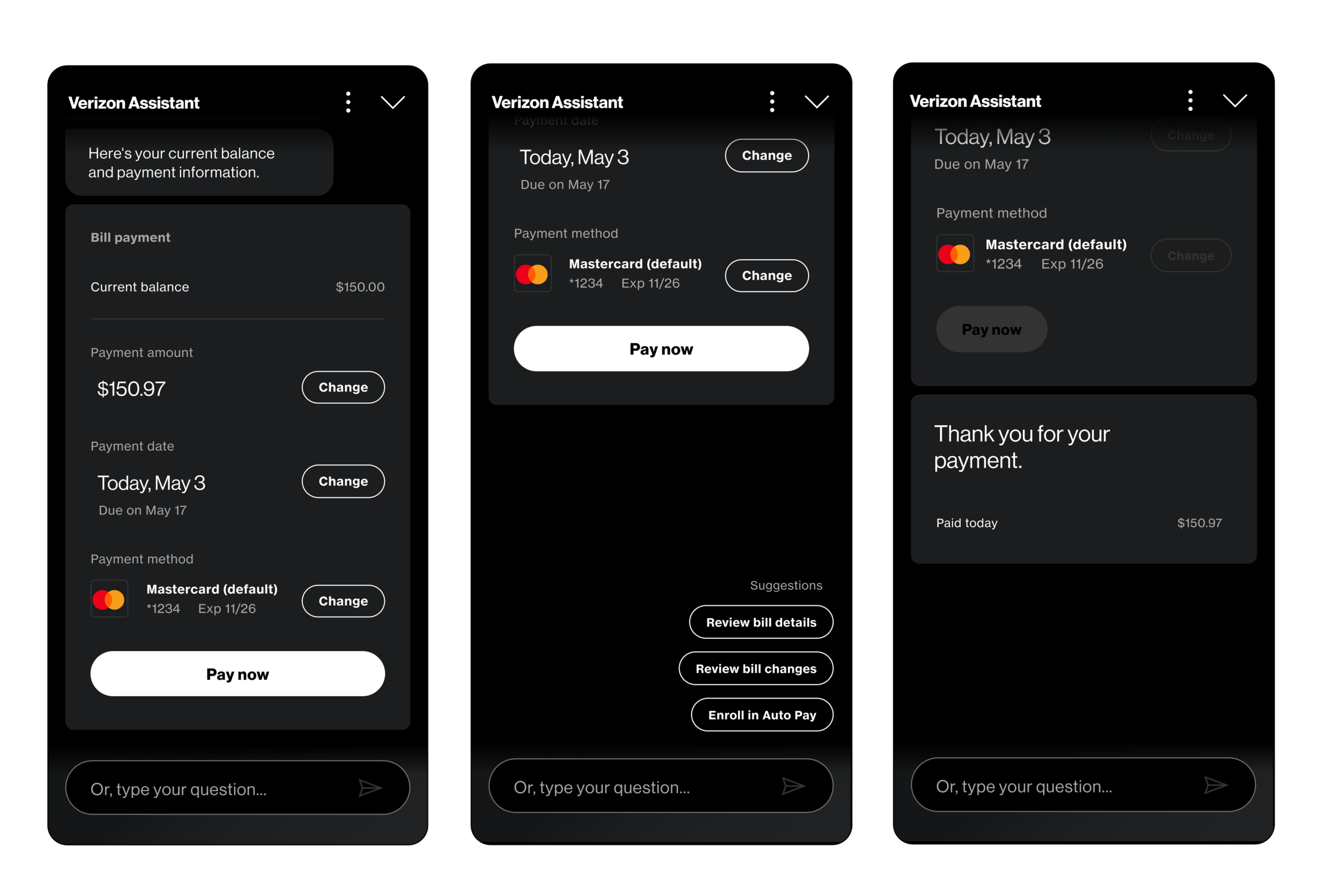
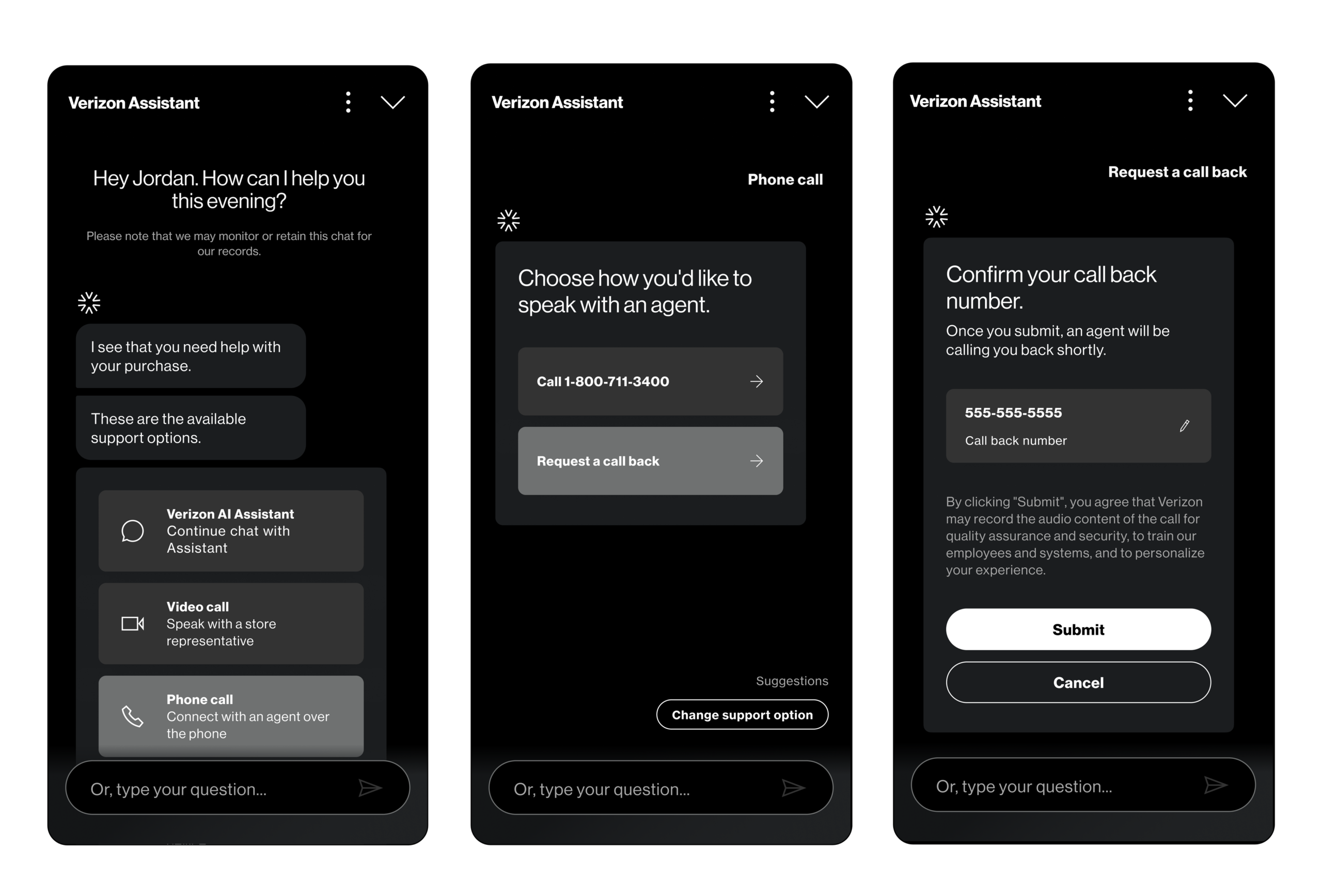
The Verizon AI Assistant UI designs are built on the foundational components defined within the conversational design system, thoughtfully applied across the three core customer journeys identified during research - choosing a product or plan, paying a bill, and getting technical support. Each scenario was carefully crafted to capture the key touch points and deliver a consistent, customer-focused experience at every stage of the conversation.
Choosing a Product/Plan
The product and plan flow showcases the AI assistant's predictive capabilities at their best. When a customer lands on the product or plan wall, the assistant proactively surfaces relevant recommendations based on browsing context, asking targeted qualifying questions around budget, usage, and current plan before presenting a curated set of options directly within the widget. Customers can explore, compare, and ask follow-up questions without ever leaving the conversation, reducing the decision-making friction that previously sent users bouncing between pages.
Paying a Bill
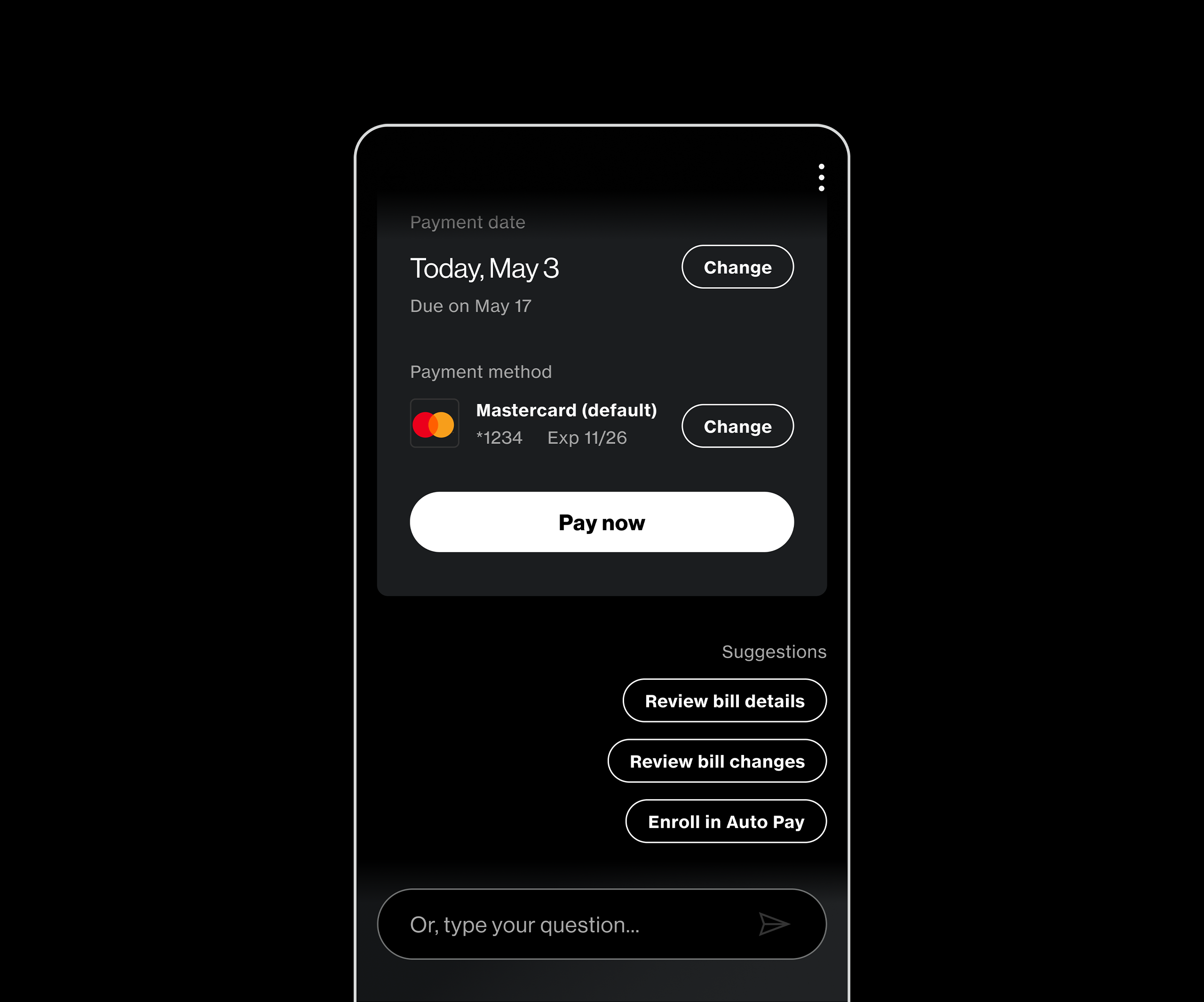
For the billing flow, the widget component displays a customer's current balance and gives the option to pay directly within the assistant's interface — without navigating through multiple pages on Verizon's main website. Customers are now able to view their itemized bill, understand any changes to their balance, confirm their payment method, and complete the transaction all within one conversational layout. What previously required multiple steps and page redirects now happens in a single, seamless exchange.
Technical Support
The technical support flow demonstrates the assistant's ability to replace the most frustrating part of the old chatbot experience — the endless loop of generic prompts and unresolved handoffs. The revamped flow uses inline form fields and a multi-choice support option for chatting with AI Assistant, video call or a phone call with an agent. Rapidly narrowing down the customer's steps to get technical support, and guiding users through targeted troubleshooting steps. When escalation to a live agent is necessary, the assistant schedules a callback with full context already attached - so the agent never starts cold.
Results and Impact
Since launching the new Verizon AI Assistant, the results have validated the investment in getting the experience right from the ground up. By deeply understanding individual customer frustrations and designing around the three highest-frequency use cases, the user engagement and customer retention increased by more than 40% - a direct reflection of customers finding genuine value in an assistant that resolves issues rather than redirecting them. Product and plan sales driven through the conversational interface also saw a 25% uptick, validating Verizon's early belief that a well-designed AI assistant could serve as a meaningful commerce touchpoint — not just a support tool.